Linux Pro
16GB RAM, 8 vCPUs, 320GB storage, 6TB Transfer. Run databases alongside your application with headroom to spare.
About
For workloads with an appetite: 8 vCPU and 16GB RAM handles concurrency — more workers, more connections, bigger caches.
This is the tier for a busy API under real load, an Elasticsearch or ClickHouse node, video transcodes that shouldn’t queue for an hour, or one box consolidating what used to be three smaller ones.
What people run on it
Busy API tier
Node/Go/Python services with enough cores to keep p95 flat under real traffic.
Search & analytics
A single-node Elasticsearch, Meilisearch at scale, or ClickHouse for event data.
Media processing
ffmpeg transcodes and image pipelines that need sustained CPU, not bursts.
Why run it here
Opens as a terminal or desktop in your browser
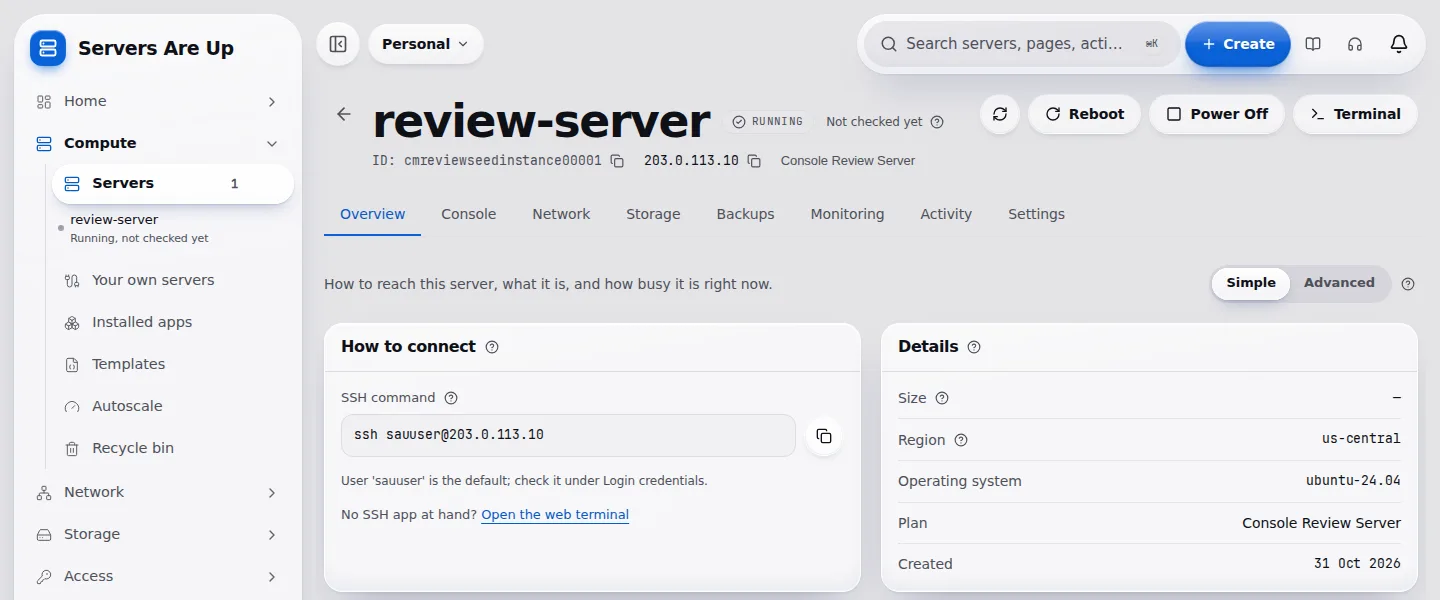
Open a Linux root shell over SSH or a Windows Server desktop over RDP right inside the Datacenter Console, with two-way clipboard and pop-out windows.
Closed to the internet until you open a port
Inbound public ports stay closed until you publish an entry point or port forward and optionally restrict it to your own IP ranges.
Sized a la carte at checkout or later
Pick a standard plan or dial exact vCPU, memory and storage in checkout, priced from the base plan plus per-unit add-ons.
Driven by the AI you already use
Connect Claude Code, Codex or any MCP client to /api/mcp/v1 with a scoped token to run commands, take snapshots and manage ports.
What it looks like

Choose an Image
What's included
- Closed to the internet until you open itNothing on the internet reaches your server until you turn its public access on from its page; the console in your browser works either way.
- SSH accessTurn on public SSH from your server’s page, then connect with an SSH client.
- Terminal in your browserOpen it from the dashboard, with the clipboard in the toolbar and nothing to install.
- Full root access
- Persistent storage
- Transfer per plan specsGenerous transfer included in the price, up to your plan’s pool.
- Automated provisioningBuilt and started for you as soon as you pay.
- SLA with service creditsOur SLA gives service credits when qualifying downtime passes one hour in a month. We do not publish an uptime percentage.
Costs extra
- Dedicated public IPv4$5/mo each — add a direct public endpoint when forwarded ports are not enough.
Features
Full root access
Complete administrative control over your virtual machine
Plan-defined resources
Each plan publishes its vCPU and RAM allocation; provider compute remains shared unless a written custom agreement says otherwise
Tested Linux images
Choose from the Linux images we have tested on this plan
Snapshots & data-volume backups
Take and restore system-disk snapshots from the server page, or attach a daily data-volume backup offer
SSH key authentication
Secure access with your own SSH keys—password-free login
Frequently Asked Questions
- How is Linux Pro billed and set up?
- Linux Pro starts at $28.00/month with published resource allocations and no hidden setup fees. Once checkout completes, the provisioning worker builds and verifies the service automatically with no manual approval step.
- How do I access Linux Pro and are inbound ports open by default?
- Inbound public ports start closed to the internet until you open them from your server page. You get full root access within the Acceptable Use Policy via the browser SSH terminal in the Datacenter Console right away, or over native SSH with your SSH keys once you turn on public SSH.
- How do snapshots, backups, and AI automation work with Linux Pro?
- You can take and restore system-disk snapshots from your server page, stream encrypted tar archives to your own S3-compatible or Azure-backed Cloud Storage (/cloud-storage), or purchase a daily Cinder data-volume backup offer. You can also manage Linux Pro from Claude Code, Cursor, or Codex via /api/mcp/v1.
- Can I configure custom vCPU, RAM, and storage sizes on Linux Pro?
- Yes. You can customize Linux Pro to any whole-number configuration between 1 and 96 vCPU, 1 and 512 GB ECC RAM, and 120 to 2,048 GB storage before checkout—and upgrade in place later to larger Linux plans without losing your data volume.
- How does Linux Pro integrate with Managed Cloud Storage and Cloud Databases?
- Every Servers Are Up account includes a 5 GiB free developer tier of Managed Cloud Storage hosted via Microsoft Azure (/cloud-storage, scaling from 250 GiB at $9/mo to 25 TiB at $399/mo with double AES-256-GCM + Azure SSE encryption and WORM locks) plus 100,000 free monthly Request Units on SAU Multi-Model Cloud Database (/cloud).
- What happens if I cancel Linux Pro or want to test network routes first?
- You can test round-trip network routes from your ISP before buying using our public speedtest (/speedtest) and 22 free browser network tools (/tools). When you cancel an active subscription from your dashboard, there are no early-termination penalties.
Order Summary
Size this server
Up to 96 vCPU, 512 GB memory and 2048 GB storage. Priced as the cheapest plan plus add-ons that covers it.
Deploy multiple instances together
No setup fees · Cancel anytime · Use code WELCOME20 for 20% off your first order · Refund policy
Embed “Deploy on Servers Are Up” README Badge
Share Linux Pro in your GitHub README or docs. Readers get 20% off their first invoice with WELCOME20.
[](https://serversareup.com/products/linux-pro?promo=WELCOME20)Architecture & Buyer Guide: Linux Pro
$28/mo ($1.75/GB RAM)How Linux Pro compares on $/GB RAM, root access, and custom KVM sizing
Linux Pro provisions an isolated KVM Linux virtual machine (8 vCPU, 16 GB ECC RAM, 320GB storage) at $28/mo ($1.75/GB RAM vs $6.00/GB on legacy cloud droplets) with full root SSH access within our Acceptable Use Policy, default-closed inbound firewall ports, browser SSH console, 69 included 1-click open-source app installers in the console Apps tab, and custom sizing from 1–96 vCPU, 1–512 GB RAM, and up to 2048 GB storage.
?size=<vcpu>vcpu-<ram>gb-<storage>gb) to dial in exact CPU, memory, and storage before checkout.| Evaluation Dimension | Linux Pro (Servers Are Up) | Legacy Hyperscaler / Droplet |
|---|