Servers Are Up
Virtual Datacenter
PricingFree Tools
Sign inBrowse catalog
Servers Are Up
Virtual Datacenter
PricingFree Tools
Sign inBrowse catalog
Servers Are Up

Your apps, automation and data on hardware we own. Build a private stack with predictable capacity and access through your dashboard, API or SSH.

SLA with service creditsOwned hardwareUS-based

Make room for your next idea

Explore the capacity, apps and access options that fit your workload. Check current availability and your total before you buy.

Sign up freeView Pricing

Products

  • Linux VPS
  • Windows VPS
  • Cloud & SaaS Services
  • Cloud Storage (Azure)
  • Virtual Datacenter
  • AI & Agent Hosting
  • Containers
  • Instant Apps
  • Software Platforms
  • Network builder
  • Game Servers
  • Free Game Servers
  • Pricing

Resources

  • Free Network Tools
  • 2026 Pricing Benchmark
  • Live SVG Badges
  • Latency & Speed Test
  • Guides & Tutorials
  • Documentation
  • API Reference
  • MCP Server
  • CLI & SDKs
  • OpenAPI & llms.txt
  • Use Cases
  • Free Migration
  • Uptime & Reliability
  • Datacenter
  • System Status
  • Network
  • Provider Comparisons Hub
  • Compare Providers

Company

  • About Us
  • Enterprise
  • Security Architecture
  • Trust Center
  • Blog
  • FAQ
  • Compliance
  • Startup Program
  • Open-Source Sponsorship
  • Press & Media Kit
  • Referral Program
  • Help Center
  • Contact Us
© Servers Are Up
TermsPrivacySLARefund PolicyDPAAcceptable Use
Service information
Infrastructure

Our Network

Hardware we own and maintain — not resold public-cloud instances. Customer plans run as isolated virtual machines with plan-defined resources.
Server Network Edge & Per-Tenant IsolationDefault-off inbound · 3D Topology Builder · Readback-verified firewall rules
1. Public EdgeUS-owned routingHTTPS / TLS EdgePortal & API encryptionThreat FilteringAutomated IP blocklistsBrute-Force ShieldRate & auth protection2. Entry PolicyDefault-off inbound portsBrowser ConsoleSSH & RDP without public portScoped Entry PointsCIDR-restricted SSH / HTTPSWireGuard & TunnelsDevice VPN & site-to-site3. Isolated Tenant VLAN & WorkloadsZero cross-tenant traffic · KVM hardware virtualizationLinux & Windows VMsDedicated vCPU & RAMReadback firewall rulesApp & Docker HostsPrivate East-West DBAuto HTTPS routingConnected Clouds, On-Premises Hybrid Nodes & Storage FabricAnsible endpoint telemetry · Pentest & exposure audit · iSCSI / SMB3 / NFSv4 / S3 mountsManaged in 2D / 3D Network Builder (/dashboard/network)
Architectural view: every customer environment receives per-tenant VLAN isolation and default-off inbound ports, with browser console access, WireGuard VPN, and readback-verified firewall rules.
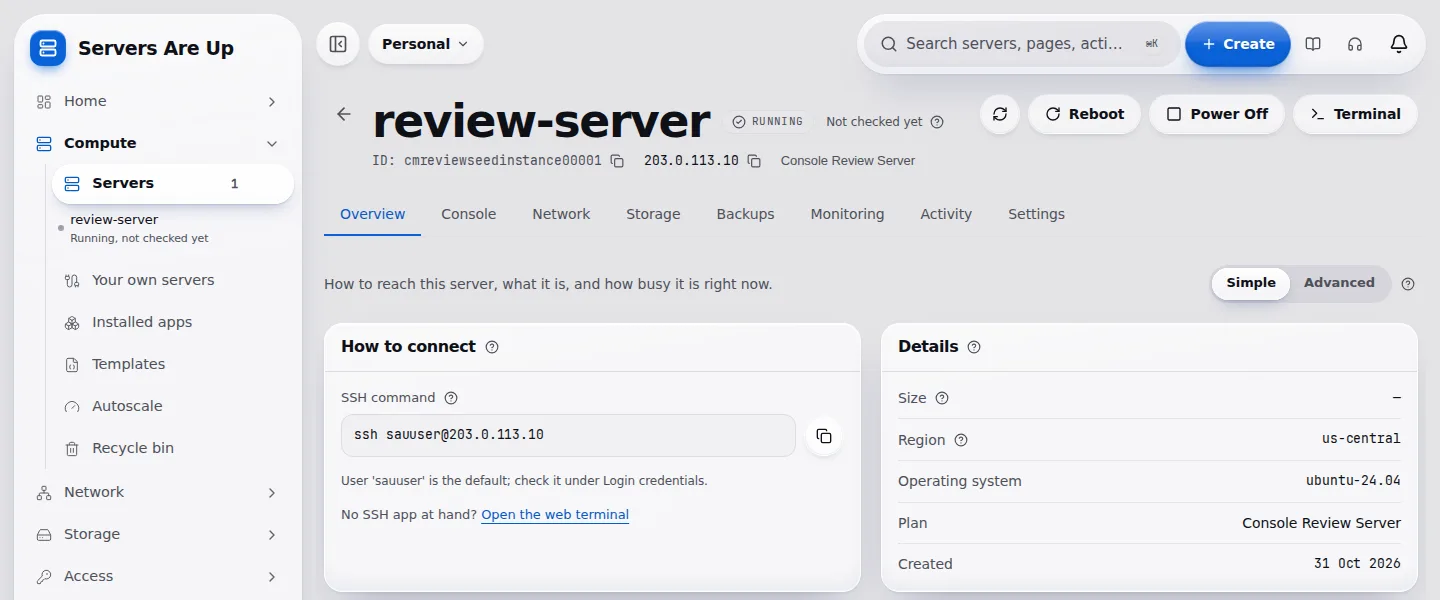
A server page in the Datacenter Console showing live network rules, entry points and isolated VLAN telemetry.A server page in the Datacenter Console showing live network rules, entry points and isolated VLAN telemetry. (dark mode)
A server page in the Datacenter Console showing live network rules, entry points and isolated VLAN telemetry. An example from the Datacenter Console, read 2026-10-31.

US-Based Infrastructure

US-based routing for customer workloads. Measure the round trip from your current connection. Test your latency

Hardware Specifications

Processors

Server-grade CPUs

Enterprise hardware built for sustained, reliable performance

Storage

Included

Storage sized to every plan across SAS RAID & ZFS pools over a 10 Gbps internal fabric

Network & Uplink

Symmetrical Fiber · 10 Gbps Internal

Multi-gigabit symmetrical fiber internet uplink, 10 Gbps internal virtual fabric, and default-off inbound ports

Compute

Plan-Defined vCPU & RAM

Isolated VMs with the vCPU and RAM quantities stated in the selected plan — up to 16 vCPU / 48GB RAM

How Your Traffic Is Handled

In transit: encrypted internal transit between infrastructure tiers
Threat filtering: automated blocking of known-bad sources, with brute-force protection
On your server: a real, isolated VM with per-customer network isolation and plan-sized persistent storage

For security reasons, we don’t publish the specifics of our network topology or the security tooling behind it.

Security

Encrypted Transit

Encrypted internal transit between infrastructure tiers

Intrusion Detection

Automated blocking with brute-force protection

Network Isolation

Per-customer network isolation between environments

We Work Hard to Keep You Online

Proactive monitoring and fast incident response — see how we approach reliability. Daily backups of a Linux server's data volume are sold as backup offers.

Uptime & reliability

Frequently Asked Questions

Where is the Servers Are Up network located and how can I test latency?
Customer workloads run on US-based server hardware we own, connected via a multi-gigabit symmetrical fiber internet uplink and a 10 Gbps internal virtual fabric. You can measure the live round-trip time and throughput from your browser at /speedtest.
How does network isolation work between customers?
Each customer environment receives an isolated network segment with default-off inbound public ports and explicit firewall rules blocking cross-tenant traffic.
Can I forward public ports to my virtual machines?
Yes. You can configure port entry points and firewall rules from your dashboard or via POST /api/v1/instances/{id}/port-forwards.

Plans and prices

Every product shows its price and whether you can buy it today.

View Plans Run Speed Test

Related

Infrastructure

How we run it

Uptime & Reliability

How we keep you online